
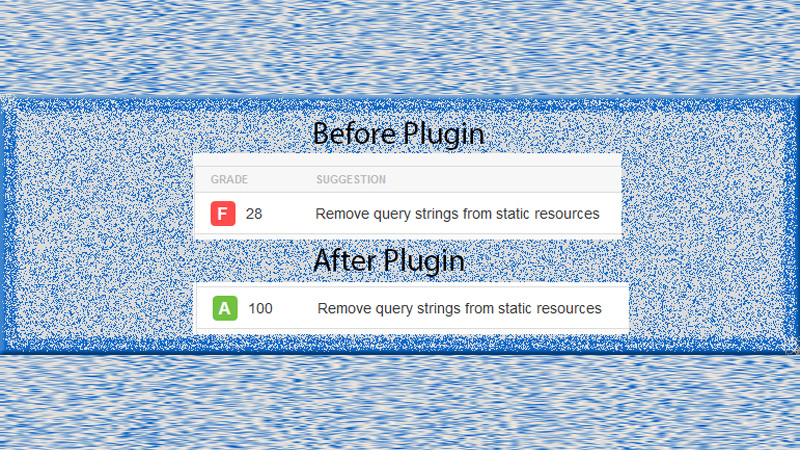
If you’ve tested your WordPress site using performance audit tools like GTmetrix, Pingdom, or Google PageSpeed Insights, you’ve likely encountered a warning that says: “Remove query strings from static resources” or “Serve assets with an efficient cache policy.”
WordPress automatically appends version numbers to your CSS and JavaScript files (such as style.css?ver=6.4.2 or script.js?v=1.2.0). While this serves a specific purpose in WordPress core, it can silently hurt your site’s loading speed and caching efficiency.
In this guide, we’ll cover what query strings are, why performance tools flag them, how they impact proxy server caching, and how you can remove them effortlessly in WordPress.
What Are Query Strings on Static Resources?
A query string is the part of a URL that follows a question mark (?). In WordPress, whenever a plugin or theme enqueues a CSS stylesheet or a JavaScript script, WordPress adds a version string at the end of the file path by default:
https://example.com/wp-content/themes/my-theme/style.css?ver=6.4.2
https://example.com/wp-content/plugins/my-plugin/assets/js/app.js?v=1.2
WordPress does this for cache busting — ensuring that when you update WordPress, your theme, or a plugin, returning visitors download the new versions instead of viewing broken layouts caused by outdated cached files.
Why Speed Audit Tools Flag Query Strings
Despite WordPress using query strings for version control, major performance testing platforms flag them as potential bottlenecks. Here is why:
Proxy Server & CDN Caching Restrictions
Many proxy servers (such as Squid), legacy CDN nodes, and corporate firewall caches refuse to cache resources containing query parameters (?). They treat any URL with a ? as a dynamic database request that might change on every hit, bypassing the cache entirely and requesting the file directly from your origin web server every time.
Redundant Origin Server Traffic
When proxy servers skip caching, every request for your CSS and JS hits your web server. This increases server CPU usage, drains bandwidth, and slows down page load times for visitors behind proxy networks.
Duplicate Resource Fetches
If different pages or plugins call the same script with slight variations in the query string parameter (e.g. ?ver=1.0 vs ?ver=1.1), browser and proxy caches treat them as two completely separate files, forcing duplicate downloads.
How Removing Query Strings Boosts Speed
Stripping version numbers from your URLs transforms dynamic-looking file requests into clean, static file paths:
- Before:
https://example.com/wp-content/themes/my-theme/style.css?ver=6.4.2 - After:
https://example.com/wp-content/themes/my-theme/style.css
Removing the query string yields immediate performance benefits:
- 100% Cacheability: Proxy servers, CDNs, and browser caches can reliably store static CSS and JS files long-term.
- Lower Server Load: Eliminates unnecessary origin server requests for static assets.
- Cleaner Speed Scores: Resolves GTmetrix and Pingdom warnings, elevating your overall performance score.
How It Works Under the Hood in WordPress
In WordPress PHP, stylesheets and scripts are registered using functions like wp_enqueue_style() and wp_enqueue_script(). WordPress passes these URLs through two core hooks before rendering the final HTML <head> and <footer> output:
style_loader_src(for CSS files)script_loader_src(for JavaScript files)
A developer can clean up resource URLs by hooking into these filters and stripping out any ?ver= or &ver= parameters using PHP’s remove_query_arg() or preg_replace().
Fix It with One Click: Leverage Browser Caching PRO
Instead of manually editing your theme’s functions.php file — which can break during theme updates — you can automate this process with Leverage Browser Caching PRO.
As part of its comprehensive Asset Optimization suite, Leverage Browser Caching PRO features a dedicated Remove Query Strings toggle that strips parameters from static files automatically across your site.
How to Enable It:
- Navigate to Leverage Browser Caching PRO in your WordPress dashboard.
- Click on the Server / Asset Optimization tab.
- Toggle on Remove Query Strings from Static Resources.
- Click Save Changes.
Once enabled, all outgoing enqueued CSS and JavaScript URLs are sanitized instantly before being output in the HTML document.
Why Choose Leverage Browser Caching PRO?
While removing query strings is a powerful optimization on its own, Leverage Browser Caching PRO goes far beyond single-purpose plugins by combining full-site performance tools into one seamless dashboard:
- Browser Caching & Expirations: Native
.htaccessrules for images, fonts, CSS, JS, and HTML. - CSS & JS Minification: Strips comments and whitespace from external scripts and inline code blocks.
- Defer & Delay JS: Defers non-critical scripts and delays heavy JavaScript execution until user interaction.
- Google Fonts Optimization: Preconnects and enables
display=swapfor faster typography rendering. - HTML & Head Cleanup: Minifies HTML markup and removes bloat like core Emojis, WP Embeds, and RSD links.
- GZIP & Keep-Alive: Enables server-level HTTP compression and persistent connections.
How to Verify the Fix
After turning on the Remove Query Strings setting in Leverage Browser Caching PRO:
- Open your site in an Incognito / Private browser window.
- Right-click anywhere on the page, select Inspect Element, and go to the Network tab.
- Reload the page and inspect your
.cssand.jsfile requests. - You will see clean URLs ending in
.cssor.jswithout any appended?ver=parameters. - Re-test your site on GTmetrix or Pingdom — the “Remove query strings from static resources” audit will now pass with flying colors!
Conclusion
Query strings on static assets were designed for version control, but they often do more harm than good by preventing proxy servers and CDNs from caching essential CSS and JavaScript files.
By stripping query strings with Leverage Browser Caching PRO, you ensure maximum cache efficiency across every layer of the web stack while improving load times for your visitors and boosting your performance audit scores.
Ready to streamline your site’s static assets? Enable Leverage Browser Caching PRO today and unlock peak WordPress performance.